 TEQENG
Before you start: check your edition
The key must match the edition installed. Open Settings → System → About and read the Edition line: Windows 11 Pro or Windows 11 Home. A Pro key activates Pro and a Home key activates Home. The one exception: entering a Pro key on Home upgrades it to Pro without reinstalling, see upgrading Home to Pro.
Method 1: from Settings (easiest)
- Open Settings with Win + I.
- Go to System → Activation. The current activation state is at the top.
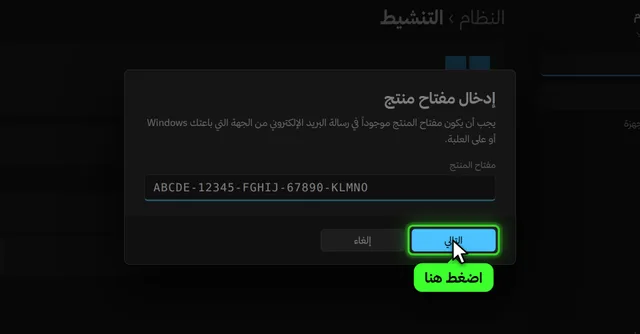
- Click Change next to Change product key to open the key box.
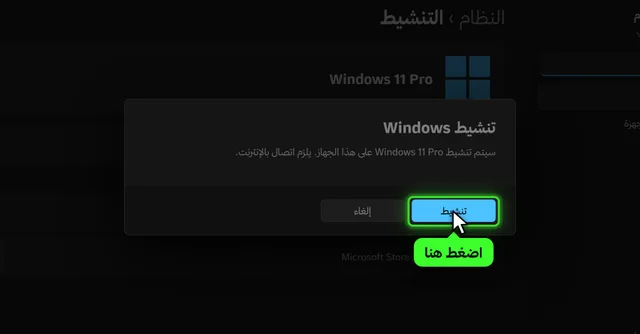
- Paste the 25 character key, then Next and Activate. The PC must be online.
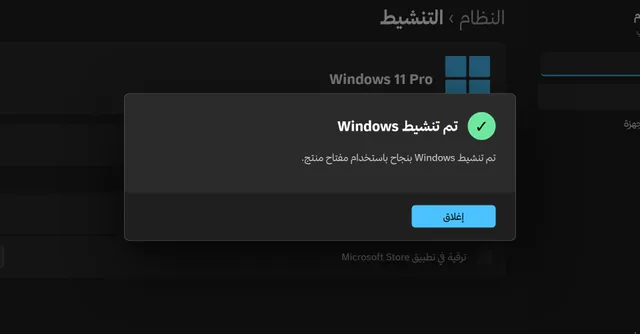
- Wait for “Windows is activated” and confirm the state shows Active on the same page.
Method 2: slmgr commands (if Settings gets stuck)
If the Activate button does nothing, or an error says the copy is set up for business (KMS) activation, use slmgr. It ships inside Windows in the System32 folder; it is not something you download.
- Right click Start and choose **Terminal (Admin)**.
- Install the key with the first command below (put your key in place of the X).
- Activate online with the second command; a success message appears.
slmgr /ipk XXXXX-XXXXX-XXXXX-XXXXX-XXXXX
slmgr /ato
If an old KMS activator was used on the PC, remove its key first with slmgr /upk and then slmgr /cpky. Error codes are explained in Windows activation errors.
Method 3: after a reinstall or a hardware change
If Windows was activated before and you reinstall on the same PC, it usually activates by itself once online, because the digital license is stored by Microsoft for that device. If you replaced the motherboard:
- Link the license to your account first: sign in with a Microsoft account under **Accounts → Your info**; the Activation page then shows the license linked to your account.
- After the change, open Activation and click **Troubleshoot**.
- Choose “I changed hardware on this device recently”, sign in, and pick your device.
This works with Retail keys. OEM keys stay with the first device; see OEM vs Retail keys.
Activating without internet
Activation needs to reach Microsoft for a minute. With no internet on the PC, use your phone as a hotspot, activate, then disconnect. Some PCs also offer phone activation when you run slui 4 from Win + R, but it does not appear for every key, so the hotspot is the reliable route.
Why we don’t recommend activators
- Most ask you to switch off your antivirus, which is reason enough to be careful.
- They create temporary KMS activation that renews every 180 days and can break after an update.
- Some install miners or data stealers, and you cannot tell what else was installed.
Full comparison: activator tools or a genuine key?.
Check the activation is permanent
Press Win + R and run slmgr /xpr. “The machine is permanently activated” means you are done; an expiry date means a temporary activation. More in how to check Windows activation.
Need a genuine key?
Our keys are genuine, activate online for one PC for life, and arrive in My Library with the steps. If a key does not work on first activation we replace it or refund you.


Common questions
Can I use Windows 11 without activating?
For a while, yes, but a watermark appears and personalization settings such as wallpaper and colors are locked. Permanent activation needs a genuine key or an existing digital license.
Is slmgr third party software?
No. slmgr is a Microsoft script inside Windows in System32; you never download it.
How long does activation take?
Usually under a minute after entering the key, as long as the PC is online.
Do I enter the key again after a reinstall?
On the same PC usually not, it reactivates from the digital license. If it does not, enter the same key on the Activation page.
I got an error code, what now?
Each code has a cause and a fix; the common ones are in Windows activation errors.