 TEQENG
What activators do
Most of them emulate a corporate activation server (KMS) on your PC so Windows believes it is activated. That activation is temporary and the tool renews it with a background task. Some patch system files directly.
Why they are risky
- They ask you to disable antivirus, because antivirus flags them. Anything else in the same download then runs unchecked.
- Modified files from unknown sources: many password and account thefts start this way.
- Activation breaks after Windows updates or if the tool is removed.
- It violates the Microsoft license, which matters on work and business PCs.
Genuine activation, no tools
- Open Settings → System → Activation. Or press Windows + I.
- Click Change next to Change product key.
- Paste the key, click Next, then Activate. The PC must be online.
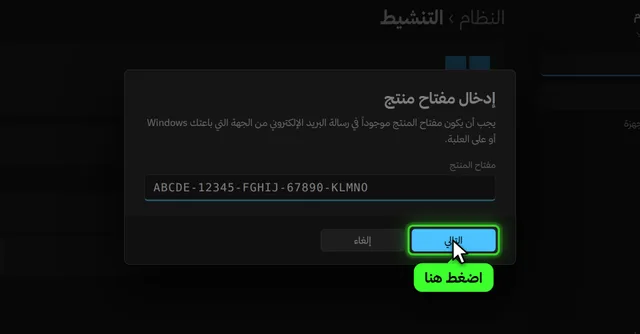
Full walkthrough in activating Windows 11 with a genuine key.
All three tool-free activation methods step by step: activate Windows 11 without software.
How to spot a risky activator file
You do not need to be an expert to be suspicious. These signs repeat in most activators shared on forums and video channels:
- The file is a password-protected archive and the description tells you to disable antivirus before extracting. Password protection stops antivirus from scanning what is inside.
- The site sends you through several ad pages before the download, or asks you to install a "download manager".
- The tool asks for administrator rights and adds a scheduled task that runs every time the PC starts.
- After running it, your browser or start page changes, or the PC gets slower and the fan spins hard for no reason.
Day-to-day difference
| Activator tool | Genuine key | |
|---|---|---|
| How it activates | A program running in the background | A key entered once in Settings |
| Duration | Temporary, renewed | Permanent on the same PC |
| Windows updates | Can break activation | No effect |
| Antivirus | Usually asks you to disable it | Stays on |
| After a reinstall | Download the tool again | Usually re-activates online by itself |
If you already used an activator
- Run a full scan from Windows Security → Virus & threat protection.
- Change the passwords of your important accounts (email, banking) from another device.
- To start clean, back up your files, reinstall Windows, and activate it with a genuine key.


Common questions
Why does antivirus delete the activator by itself?
Because the way it works looks exactly like malware: it changes system services, adds hidden tasks and connects to unknown servers. Windows Security cannot tell a "clean" activator from one carrying spyware, so it removes both. When a guide tells you to add an exclusion or switch protection off, you open the door to everything in that file, not just the activation.
The damage is often invisible at first. Info-stealers run quietly and grab saved browser passwords and logged-in sessions, and you may only notice weeks later when someone signs in to your account.
Can I activate Windows 11 without any software?
Yes, with a genuine key from Settings → System → Activation → Change product key.
Is KMS activation permanent?
No. It expires and the tool renews it in the background; after an update or removal Windows shows as not activated again.
How do I confirm permanent activation?
Run slmgr /xpr in Command Prompt. A genuine activation reports the machine is permanently activated. See how to check Windows activation.