 TEQENG
Method 1: Settings
- Press Windows + I.
- System → Activation. Activation state shows Active or Not active.
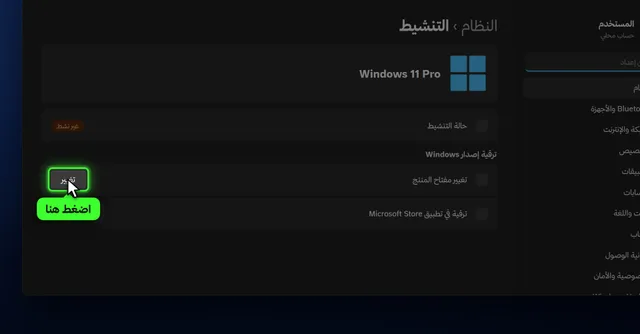
Method 2: Is it permanent? (slmgr)
slmgr /xpr- The machine is permanently activated: permanent activation, as with a genuine key.
- An expiry date: temporary activation, usually from an activator or corporate licensing.
Method 3: Home or Pro?
- Settings → System → About.
- Under Windows specifications, check Edition. Windows 11 Home or Windows 11 Pro.
A Pro key activates Pro and a Home key activates Home. A Pro key can upgrade Home without reinstalling: see upgrading Home to Pro.
To see the license type (Retail, OEM or Volume), run slmgr /dli. Details in OEM vs Retail keys.
What the Activation page messages mean
| Message | Meaning |
|---|---|
| Windows is activated with a digital license | The PC is activated and the license is stored by Microsoft for this hardware |
| Windows is activated with a digital license linked to your Microsoft account | Same as above, linked to your account so it is easier to restore after a hardware change |
| Windows is activated with a product key | Activated with the key you entered in Settings |
| Windows is not activated | No valid license, or the license does not match the edition |
| Your organization manages activation | The PC belongs to a company and activates from its server |
Link activation to your Microsoft account
If you sign in to Windows with a Microsoft account, the digital license links to it. If you later replace a major part such as the motherboard, open Troubleshoot on the Activation page and choose "I changed hardware on this device recently" to restore activation.
If it says Not active
- Check your internet connection and try Troubleshoot on the Activation page.
- If you replaced a major part such as the motherboard, the old activation may not come back by itself.
- If an error code appears, look it up in Windows activation errors and fixes.
Before buying a key
- Check the edition under About and buy a matching key: Home for Home, Pro for Pro.
- If the Activation page already says Active, you do not need a new key.
- If activation is temporary (an expiry date in
slmgr /xpr), a genuine key turns it into a permanent activation.


Common questions
How to see the installed Windows key
slmgr /dli shows the last five characters of the installed key, which is enough to confirm it is the key you entered. If your PC shipped with Windows, the original key is stored in the firmware, and PowerShell shows it with:
(Get-CimInstance -ClassName SoftwareLicensingService).OA3xOriginalProductKeyAn empty result means the PC did not ship with a factory key, which is normal for custom-built PCs.
What happens if Windows is not activated?
It still runs, but shows an Activate Windows watermark and personalization settings are locked.
Does a clean install remove activation?
On the same PC, Windows usually re-activates by itself once online, especially if activation is linked to a Microsoft account.
How do I see my Windows version quickly?
Press Windows + R, type winver and press Enter.
Does the Activate Windows watermark slow the PC?
No, performance is the same. The watermark stays in the corner and personalization settings such as wallpaper and colors are locked.
What is the difference between slmgr /xpr and slmgr /dli?
slmgr /xpr tells you whether activation is permanent or has an expiry date. slmgr /dli shows the license type, the last five characters of the key and the license status.